What’s New in WorktreeWise 1.1.0
WorktreeWise 1.1.0 transforms how developers manage and collaborate across multiple Git worktrees. This release introduces a repository-wide overview dashboard, an advanced worktree creation wizard with sparse checkouts and environment isolation, a multi-pane workspace for terminal sessions and autonomous AI coding agents, reusable multi-step workflows, privacy-focused Git Log and Diff tools, and a review-first pruning workflow.
Release Highlights at a Glance
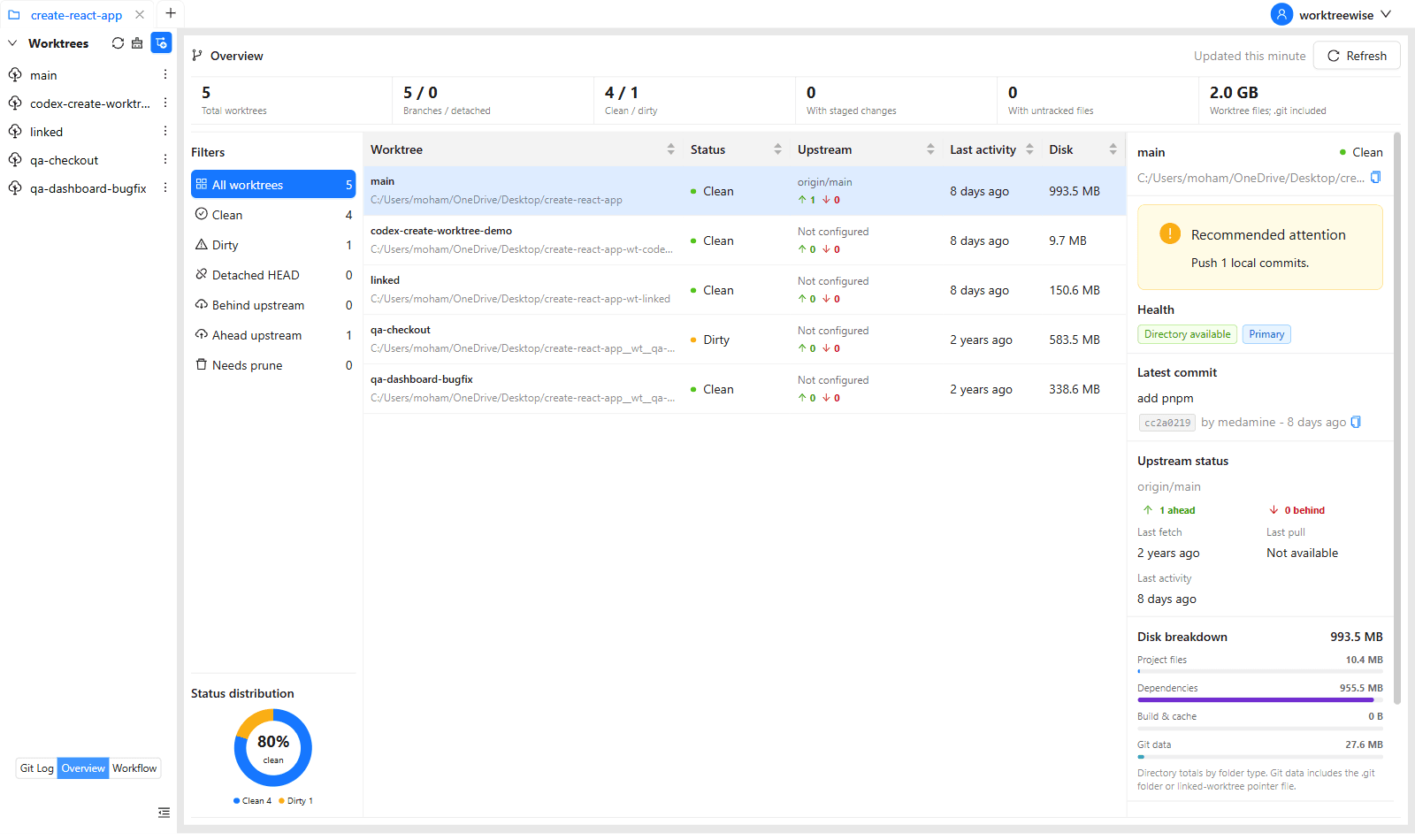
6 real-time metric cards, clean vs. dirty donut chart, 4-way disk space usage breakdowns, and upstream divergence tracking.
Worktree Overview DashboardCreate from HEAD, branches, or tags with sparse checkouts, node_modules symlink sharing, and multi-source .env isolation.
Advanced Worktree CreationRun up to 3 AI coding agents (Claude, Codex, Cursor CLI, Antigravity, Qwen, Kimi, OpenCode) side by side with Smart Context.
AI Agents & Tiled TerminalsDefine, import, duplicate, and execute multi-step commands sequentially or in parallel with live ANSI log streaming.
Multi-Step WorkflowsVisual commit graph, privacy column toggles (Author, Date, SHA, Refs), Working Tree file staging, and commit authoring.
Interactive Git LogCompare any two worktrees, branches, tags, or commits side by side or line by line with word-level difference highlighting.
Pairwise Git Diff1. Repository & Worktree Overview Dashboard
WorktreeWise 1.1.0 introduces a comprehensive repository dashboard that gives developers instant visibility into all active checkouts without running manual Git CLI commands:
- 6 Metric Summary Cards: Real-time counters for Total Worktrees, Clean Worktrees, Dirty Worktrees, Ahead/Behind tracking, Total Disk Footprint, and Stale References.
- Clean / Dirty Donut Chart: Visual distribution of uncommitted working tree states across the entire repository.
- Worktree Details Inspector: Click any worktree in the table to open a detailed health panel showing latest commit info, branch tracking status, and large untracked file warnings.
- 4-Way Disk Breakdown: Track bars visually isolate space consumed by Project Files, Git metadata (
.git),node_modules, and untracked artifacts.
👉 Learn more in the Worktree Overview Guide
2. Advanced Worktree Creation Wizard
Spinning up a worktree in version 1.1.0 goes far beyond standard git worktree add:
- 3 Creation Modes: Check out directly from
HEAD, an existing local/remote tracking branch, or a Git release tag. - Sparse Checkout: Browse the repository directory tree, inspect byte sizes for each folder, select only the directories you need, and monitor progress bars during sparse checkout initialization.
- Dependency Sharing: Symlink
node_modulesfrom your primary worktree to new checkouts instantly, saving gigabytes of disk space and eliminating repetitivepnpm install/npm installruns. - Environment Isolation: Automatically discovers multiple
.envfiles and templates (.env.local,.env.development,.env.example). Apply Shared, Suffix, or Auto-Port strategies with secret masking and copyable generated previews. - Lifecycle Hooks: Attach custom shell pre-hooks and post-hooks that run automatically before and after worktree provisioning.
👉 Learn more in the Worktree Creation Guide
3. Multi-Pane Terminal & AI Agent Workspace
Version 1.1.0 brings first-class support for autonomous AI coding agents and multi-pane terminal workspaces:
- Multi-Pane Tiling: Split your workspace into 1, 2, or 3 columns, or use Auto layout to distribute panes dynamically based on your screen width.
- 7 Supported AI Agents: Native integration and detection for:
- Claude Code (
claude) - OpenAI Codex (
codex) - Cursor CLI (
cursor-agent) - Google Antigravity (
agy) - Qwen Code (
qwen) - Kimi CLI (
kimi) - OpenCode (
opencode)
- Claude Code (
- Smart Context: Generates and copies contextual prompts containing the worktree’s absolute path, active branch, latest commit, dirty files status, and instructions directly to the agent’s session.
- Sidebar Status Badges: The main navigation sidebar displays live glowing badges when AI agents or terminal tasks are actively executing in a worktree.
👉 Learn more in the AI Agents Integration Guide and Terminal Guide
4. Reusable Automation Workflows
Automate repetitive repository maintenance, build pipelines, and testing suites across multiple worktrees:
- Sequential vs. Parallel Execution: Execute command pipelines one worktree after another, or run them concurrently across all selected worktrees with worker pools (
Promise.all). - Pseudo-Terminal (node-pty) Engine: Commands run in full
xterm-256colorterminal sessions preserving colors, ANSI spinners, and formatting. - JSON Import & Export: Import workflow definitions from any repository’s
.git/WorktreeWise/directory with interactive preview tables and conflict detection. - Process Safeguards: Bounded 250,000-character output buffers prevent Electron memory leaks, interactive prompt interceptors prevent hanging processes, and the global Stop button (
Esc) safely terminates all active PTY subprocesses.
👉 Explore the Workflows Documentation
5. Privacy-Focused Git Log & Pairwise Git Diff
Manage commits and evaluate code divergence directly inside WorktreeWise:
- Configurable Git Log Columns: Toggle Author, Date, SHA, and Refs columns on or off with a single click. Ideal for anonymized screencasts, team demos, or focused reviews.
- Integrated Staging & Commit Authoring: Inspect uncommitted files, stage/unstage with
+and-, discard changes with safety prompts, author commit messages, and amend previous commits. - Pairwise Comparison Matrix: Compare any two entities in your repository using a 4-way source/target selector (Worktree, Branch, Tag, or Commit).
- Dual Diff Views: Toggle between Side by Side dual-pane and Line by Line unified views with word-level change highlighting and automatic theme synchronization.
👉 Explore Git Log and Git Diff
6. Review-First Worktree Pruning
CLI git worktree prune can silently discard metadata if a network drive disconnects or if a path was temporarily moved. WorktreeWise 1.1.0 replaces destructive pruning with a safe, review-first workflow:
- Dry-Run Analysis: WorktreeWise runs
preview-prune-worktreesto detect stale, detached, or missing worktrees without modifying repository records. - Interactive Checkbox Selection: Review discovered entries with their paths and staleness reasons. Deselect any worktree you plan to reconnect.
- Safe Confirmation: Only confirmed worktrees are pruned, ensuring your working tree metadata remains intact.
👉 Learn more in the Pruning Guide
7. Deep Customization & Preferences
Tailor WorktreeWise to your exact development setup in the redesigned Settings panel:
- Worktree Naming Patterns: Configure automated folder naming using
{repo}and{branch}tokens, custom separators (__wt__), or custom naming templates. - Editor Auto-Detection: Automatically detect and launch VS Code, Cursor, Windsurf, JetBrains (WebStorm, IntelliJ, PyCharm, GoLand, etc.), Zed, and Sublime Text.
- Shell Profiles: Choose from PowerShell, Git Bash, WSL (
wsl.exe), Bash, Zsh, Fish, Nushell, or specify custom shell binary paths. - International Encoding: Support for 12+ international character encodings (UTF-8, ISO-8859-1, Windows-1252, Shift-JIS, GBK, EUC-KR, Windows-1251, etc.) ensures file diffs and logs render accurately across languages.
Upgrading to 1.1.0
WorktreeWise 1.1.0 is fully backward-compatible with repositories created in earlier versions. Existing worktrees, Git branches, and settings are detected automatically upon launching the updated application.